Discretization refers to the process of transforming a continuous domain into a discrete one by representing it with a finite set of elements.
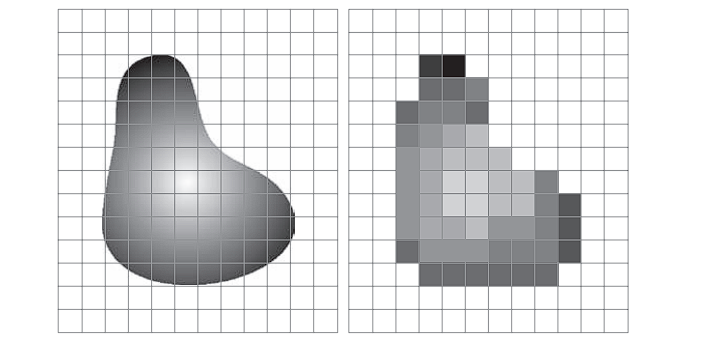
In the context of images, this typically involves converting a continuous spatial domain Ω ⊂ ℝ² (where an image is defined as a continuous function over space) into a finite grid of samples (pixels).
Sampling (Spatial Discretization)
Sampling refers to discretizing the continuous spatial domain Ω.
We choose specific points (xᵢ, yⱼ), turning f(x, y) into a grid of values:
fᵢⱼ = f(xᵢ, yⱼ)
Example:
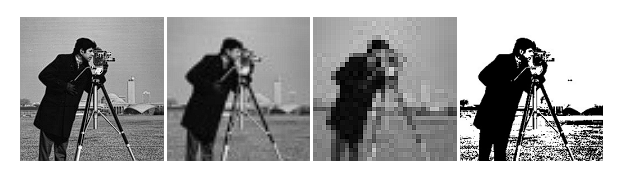
- Cameraman image at resolution 256×256 → 256 samples along each axis → 65,536 pixels.
- Reducing to 64×64 or 32×32 leads to fewer pixels and loss of detail.
Tonal Domain and Quantization (Intensity Discretization)
The tonal domain (also known as the intensity domain or range) refers to the set of all possible intensity or color values a pixel in an image can take.
Quantization is the process of discretizing the range of grey levels, mapping the continuous intensity f(x, y) to a finite set of values, typically integers.
Common case:
- 8-bit quantization → values in
{ 0, 1, ..., 255 }0: black,255: white
Binary images:
- Co-domain:
{ 0, 1 }, often rescaled to{ 0, 255 } - Result from thresholding operations, useful in document scanning, object detection, etc.
Digital Image Formation Summary
To convert a continuous image into digital format:
- Use Sampling (for space)
- Use Quantization (for intensity)
Example pipeline:
- Original grayscale image → 256×256, 8-bit depth
- Downsampling:
- Sample to 64×64 → coarse detail
- Sample to 32×32 → fine detail lost; image appears blocky
- Quantization/Binarization:
- Apply threshold (e.g., 128)
- Pixel ≥ 128 → white (255)
- Pixel < 128 → black (0)
- Apply threshold (e.g., 128)
- Result: binary image highlighting structure or edges
Color Images
A color image is defined as a function:
f(x, y): Ω → ℝ³
RGB Color Model
Standard model for display systems (monitors, cameras).
Each channel is typically 8 bits → values in [0, 255] per channel.
Examples:
[255, 0, 0]→ red[0, 255, 0]→ green[255, 255, 255]→ white
HSV Color Space
HSV stands for:
- Hue (H): Color type (e.g., red, green)
- Saturation (S): Color purity/intensity
- Value (V): Brightness
Advantages:
Perceptually uniform – better aligns with how humans perceive color, making it useful in:
- Object tracking
- Image segmentation
- Thresholding in color space
| RGB (R,G,B) | HSV (H,S,V) |
|---|---|
| [255, 0, 0] | [0°, 1, 1] (pure red) |
| [0, 255, 0] | [120°, 1, 1] (pure green) |
| [0, 0, 255] | [240°, 1, 1] (pure blue) |
| [128, 128, 128] | [0°, 0, 0.5] (grey) |